> ## Documentation Index
> Fetch the complete documentation index at: https://transfiya.me/llms.txt
> Use this file to discover all available pages before exploring further.
# Tipo 1 Listar transacciones
> Listar transacciones pendientes e historicas
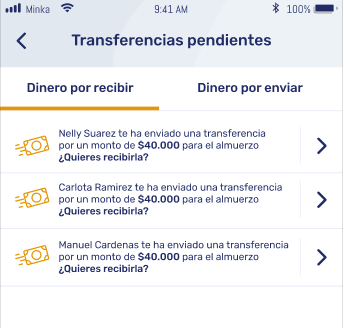
### Listar transferencias pendientes de tipo TYPE1
Obtiene una lista de transferencias pendientes en las que el teléfono del usuario es el receptor.
**GET** `/v1/transfer?labels.type="SEND"&target="$userPhone"&labels.status="PENDING"&sortBy="created"&sort="desc"`
 ```json theme={null}
ApiResponse response = transferApi.GetTransfersWithCustomQuery("target=$57XXXXXXXXXX" + "&labels.type=SEND" + "&labels.status=PENDING");
```
```json theme={null}
var API_KEY = "5b481fc2ae177010e197026b39c58cdb000f4c3897e841714e82c84c"; // String |
var Tinapi = require('tinapi_');
var defaultClient = Tinapi.ApiClient.instance;
// Configure API key authorization: ApiKeyAuth
var ApiKeyAuth = defaultClient.authentications['ApiKeyAuth'];
ApiKeyAuth.apiKey = API_KEY;
const transferApi = new tinapi.TransferApi()
const customQuery =
"labels.type=SEND&labels.status=PENDING&target=$573002414263"
transferApi.getTransfers(customQuery)
.then(transfers => {
console.log(transfers)
}).catch(console.log)
```
```json theme={null}
Transfers transfers = sdkApiClient.getTransfersWithCustomQuery("?labels.type=SEND&labels.status=PENDING");
System.out.println(transfers);
```
### Obtener historial de transferencias recibidas
**GET** `/v1/transfer?type="SEND"&target="$userPhone"`
Consulta el historial de transferencias en las que el teléfono del usuario es el receptor.
```json theme={null}
var API_KEY = "5b481fc2ae177010e197026b39c58cdb000f4c3897e841714e82c84c"; // String |
var Tinapi = require('tinapi_');
var defaultClient = Tinapi.ApiClient.instance;
// Configure API key authorization: ApiKeyAuth
var ApiKeyAuth = defaultClient.authentications['ApiKeyAuth'];
ApiKeyAuth.apiKey = API_KEY;
var apiInstance = new Tinapi.ActionApi();
var type = "SEND"; // String |
var opts = {
'target': "$userPhone" // String |
};
apiInstance.getTransfer(type, opts).then(function(data) {
console.log('API called successfully. Returned data: ' + data);
console.log(data);
}, function(error) {
console.error(error);
});
```
```json theme={null}
string type = "SEND";
string target = "$userPhone";
string source = null;
string API_KEY = "5b481fc2ae177010e197026b39c58cdb000f4c3897e841714e82c84c";
instance.Configuration.AddApiKey("API_KEY", API_KEY);
var response = instance.GetTransfersWithCustomQuery(type, source, target);
Console.WriteLine(response.Entities.Count);
Console.WriteLine(response.Entities[0]);
```
```json theme={null}
Transfers transfers = sdkApiClient.getTransfersWithCustomQuery("?targetWallet=$userPhone&labels.type=SEND&labels.status=PENDING");
System.out.println(transfers);
```
### Obtener historial de transferencias enviadas
**GET** `/v1/action?filter=type="SEND"&source="$userPhone"`
Consulta el historial de acciones tipo SEND en las que el teléfono del usuario es el remitente.
```json theme={null}
var API_KEY = "5b481fc2ae177010e197026b39c58cdb000f4c3897e841714e82c84c"; // String |
var Tinapi = require('tin_api');
var defaultClient = Tinapi.ApiClient.instance;
// Configure API key authorization: ApiKeyAuth
var ApiKeyAuth = defaultClient.authentications['ApiKeyAuth'];
ApiKeyAuth.apiKey = API_KEY;
var apiInstance = new Tinapi.ActionApi();
var type = "SEND"; // String |
var opts = {
'source': "$userPhone" // String |
};
apiInstance.getTransfer(type, opts).then(function(data) {
console.log('API called successfully. Returned data: ' + data);
console.log(data);
}, function(error) {
console.error(error);
});
```
```json theme={null}
string type = "SEND";
string source = "$userPhone";
string target = null;
string API_KEY = "5b481fc2ae177010e197026b39c58cdb000f4c3897e841714e82c84c";
instance.Configuration.AddApiKey("API_KEY", API_KEY);
var response = instance.GetTransfersWithCustomQuery(type, source, target);
Console.WriteLine(response.Entities.Count);
Console.WriteLine(response.Entities[0]);
```
```json theme={null}
Transfers transfers = sdkApiClient.getTransfersWithCustomQuery("?sourceWallet=$573004431529&labels.type=SEND&labels.status=PENDING");
System.out.println(transfers);
```
```json theme={null}
ApiResponse response = transferApi.GetTransfersWithCustomQuery("target=$57XXXXXXXXXX" + "&labels.type=SEND" + "&labels.status=PENDING");
```
```json theme={null}
var API_KEY = "5b481fc2ae177010e197026b39c58cdb000f4c3897e841714e82c84c"; // String |
var Tinapi = require('tinapi_');
var defaultClient = Tinapi.ApiClient.instance;
// Configure API key authorization: ApiKeyAuth
var ApiKeyAuth = defaultClient.authentications['ApiKeyAuth'];
ApiKeyAuth.apiKey = API_KEY;
const transferApi = new tinapi.TransferApi()
const customQuery =
"labels.type=SEND&labels.status=PENDING&target=$573002414263"
transferApi.getTransfers(customQuery)
.then(transfers => {
console.log(transfers)
}).catch(console.log)
```
```json theme={null}
Transfers transfers = sdkApiClient.getTransfersWithCustomQuery("?labels.type=SEND&labels.status=PENDING");
System.out.println(transfers);
```
### Obtener historial de transferencias recibidas
**GET** `/v1/transfer?type="SEND"&target="$userPhone"`
Consulta el historial de transferencias en las que el teléfono del usuario es el receptor.
```json theme={null}
var API_KEY = "5b481fc2ae177010e197026b39c58cdb000f4c3897e841714e82c84c"; // String |
var Tinapi = require('tinapi_');
var defaultClient = Tinapi.ApiClient.instance;
// Configure API key authorization: ApiKeyAuth
var ApiKeyAuth = defaultClient.authentications['ApiKeyAuth'];
ApiKeyAuth.apiKey = API_KEY;
var apiInstance = new Tinapi.ActionApi();
var type = "SEND"; // String |
var opts = {
'target': "$userPhone" // String |
};
apiInstance.getTransfer(type, opts).then(function(data) {
console.log('API called successfully. Returned data: ' + data);
console.log(data);
}, function(error) {
console.error(error);
});
```
```json theme={null}
string type = "SEND";
string target = "$userPhone";
string source = null;
string API_KEY = "5b481fc2ae177010e197026b39c58cdb000f4c3897e841714e82c84c";
instance.Configuration.AddApiKey("API_KEY", API_KEY);
var response = instance.GetTransfersWithCustomQuery(type, source, target);
Console.WriteLine(response.Entities.Count);
Console.WriteLine(response.Entities[0]);
```
```json theme={null}
Transfers transfers = sdkApiClient.getTransfersWithCustomQuery("?targetWallet=$userPhone&labels.type=SEND&labels.status=PENDING");
System.out.println(transfers);
```
### Obtener historial de transferencias enviadas
**GET** `/v1/action?filter=type="SEND"&source="$userPhone"`
Consulta el historial de acciones tipo SEND en las que el teléfono del usuario es el remitente.
```json theme={null}
var API_KEY = "5b481fc2ae177010e197026b39c58cdb000f4c3897e841714e82c84c"; // String |
var Tinapi = require('tin_api');
var defaultClient = Tinapi.ApiClient.instance;
// Configure API key authorization: ApiKeyAuth
var ApiKeyAuth = defaultClient.authentications['ApiKeyAuth'];
ApiKeyAuth.apiKey = API_KEY;
var apiInstance = new Tinapi.ActionApi();
var type = "SEND"; // String |
var opts = {
'source': "$userPhone" // String |
};
apiInstance.getTransfer(type, opts).then(function(data) {
console.log('API called successfully. Returned data: ' + data);
console.log(data);
}, function(error) {
console.error(error);
});
```
```json theme={null}
string type = "SEND";
string source = "$userPhone";
string target = null;
string API_KEY = "5b481fc2ae177010e197026b39c58cdb000f4c3897e841714e82c84c";
instance.Configuration.AddApiKey("API_KEY", API_KEY);
var response = instance.GetTransfersWithCustomQuery(type, source, target);
Console.WriteLine(response.Entities.Count);
Console.WriteLine(response.Entities[0]);
```
```json theme={null}
Transfers transfers = sdkApiClient.getTransfersWithCustomQuery("?sourceWallet=$573004431529&labels.type=SEND&labels.status=PENDING");
System.out.println(transfers);
```